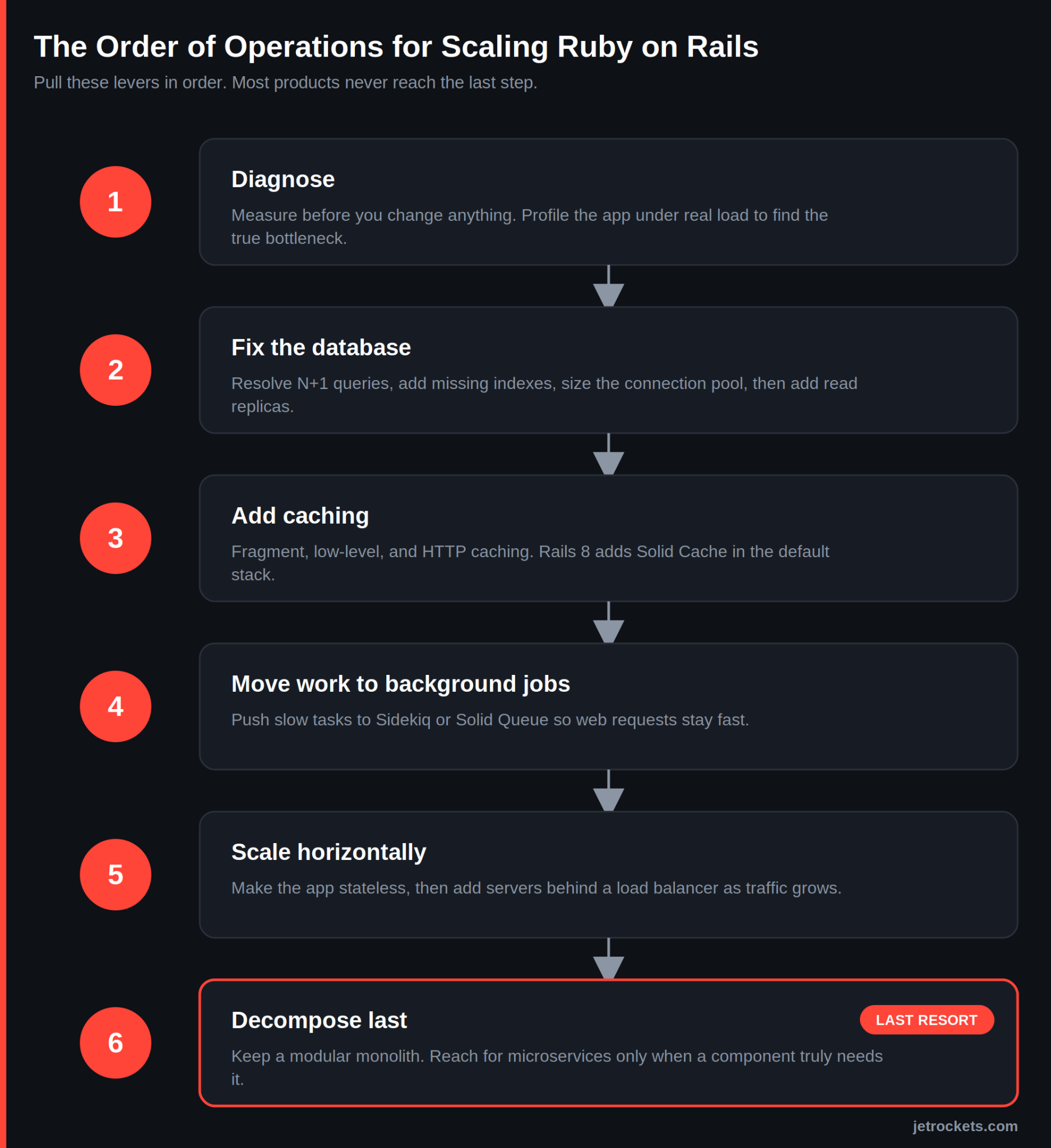
Scaling Ruby on Rails means pulling a handful of architectural levers in the right order, and that order almost always starts with the database. Most teams reach for a bigger server first because it is the easiest move available. It buys some time, then it stops working, usually during a traffic spike nobody planned for. The approach that holds up is different. Measure where the app is actually slow, fix the database, add caching, move slow work into background jobs, and only then scale out across more machines. Breaking up the monolith comes last, and for most products, it never needs to happen at all.
Two clarifications before the details. Scaling for performance and scaling for growth are related but not the same thing. Performance work makes a single request faster. Growth work lets the application handle far more requests at the same time. They overlap, and a slow app under light load is a different problem from a fast app buckling under heavy load. This guide is about the second problem, the architecture of handling more. For the speed-tuning side, our Rails optimization guide for 2025 is the companion read.
JetRockets has been Rails-only for over 15 years, and we have scaled production systems that serve real traffic for clients in fintech, healthcare, travel, and marketplaces. What follows is the order of operations we actually use, with the cost of each decision named honestly. If you want a hand applying it to your own Ruby on Rails application, that is the work we do every day.
First, Diagnose Where Your App Is Actually Slow
The cardinal rule of scaling is to measure before you change anything. Intuition about performance is wrong often enough that acting on it wastes weeks. Before touching infrastructure, profile the application under realistic load and find the actual bottleneck.
In our experience the culprits show up in a predictable order of likelihood. Database queries come first: N+1 queries, missing indexes, and unbounded result sets account for the majority of Rails slowdowns we are called in to fix. Caching gaps come next, where the same expensive work runs on every request. Then background job backlogs, where slow tasks pile up. Raw compute, the thing teams usually blame first, is last on the list and rarely the real problem.
The specific tools we reach for to find these issues are covered in 18 tools and techniques to improve Rails application performance. Bullet for N+1 detection, rack-mini-profiler for per-request timing, and a database dashboard like PgHero for slow queries will tell you more in an afternoon than a week of guessing.
If you are not sure whether you are looking at a code problem or an infrastructure problem, that is a reasonable place to bring in a second opinion. Our free Rails code audit covers architecture, performance, and security, delivered as a clear written report in two to three days with no commitment. It is the lowest-friction way to find out where your scaling wall actually is.
The Database Is Almost Always the First Wall
When a Rails app struggles under growth, the database is the first thing to give, not Ruby. The framework gets blamed for being slow, but the trace almost always leads back to queries that were fine at a thousand records and fall apart at a million.
N+1 queries are the most common offender. A page that loads a list and then fires one extra query per item will run acceptably in development and collapse in production once the list gets long. Eager loading with includes collapses those into a couple of queries. Missing indexes are the second pattern: a query that scans an entire table is invisible at small scale and catastrophic at large scale. The third is the unbounded query, the Model.all that quietly grows until it consumes all available memory.
Connection pooling is where scaling problems become outages. Rails keeps a pool of database connections, and every web and background worker process draws from it. When concurrency climbs past the pool size, requests queue waiting for a connection, response times spike, and the app appears to be down even though the database is healthy. Sizing the pool to match your actual process and thread count, and to your database connection limit, prevents a class of failures that looks mysterious until you know to look for it.
Once queries are tuned and the pool is sized, read replicas are the next lever. Most applications read far more than they write, and Rails has supported sending reads to replica databases and writes to the primary since version 6. Offloading reads to one or more replicas takes pressure off the primary and scales the read path almost linearly. For data-heavy models, storage strategy matters too. We wrote up one practical pattern in how to store large JSON in PostgreSQL with the Rails Attributes API.
Sharding, splitting data across multiple databases, is where teams often want to jump. Resist it. Sharding adds permanent operational complexity, and the overwhelming majority of Rails applications never need it. Replicas, good indexing, and query discipline carry most products further than people expect.
Once the database is in order, a Rails performance audit is the fastest way to turn the remaining findings into a prioritized plan. We tell you what to fix and in what order, ranked by impact rather than by whatever is easiest to reach.
Caching Is the Lever With the Best Return
Caching is the highest-impact scaling work most teams underuse, because the cheapest request is the one your app never has to compute. Rails ships with several caching layers, and they stack.
Fragment caching stores rendered chunks of a view so they do not re-render on every request. Russian doll caching nests those fragments so that a change to one item busts only the caches that depend on it, not the whole page. Low-level caching with Rails.cache.fetch wraps any expensive computation, a slow query or an external API call, and serves the stored result until it expires. HTTP caching pushes the problem further out still, letting browsers and CDNs serve responses without touching your servers at all.
Rails 8 changed the calculus here with Solid Cache, a database-backed cache store that ships in the default stack. For many applications it removes the need to run and pay for a separate Redis instance just for caching, using the database you already operate. Whether that is the right call depends on your read patterns and database headroom, and we cover the trade-off alongside the other Rails 8 changes in Ruby on Rails 8 features: performance, security, and developer experience updates.
The honest caveat with caching is that invalidation is where the bugs live. A cache that serves stale data after an update is worse than no cache, because the failure is silent and confusing. Cache keys that include the record and its updated timestamp solve most of this, but caching is a place to be deliberate rather than aggressive.
Background Processing at Scale
Anything slow that does not need to finish inside the web request belongs in a background job. Sending email, generating reports, processing uploads, calling third-party APIs: moving this work out of the request cycle keeps response times low and is one of the most effective scaling moves available.
For years the answer was Sidekiq backed by Redis, and it remains an excellent, battle-tested choice. Rails 8 added Solid Queue, a database-backed job system in the default stack, which like Solid Cache can remove a Redis dependency for teams that would rather operate one fewer piece of infrastructure. Sidekiq still wins on raw throughput and a mature ecosystem; Solid Queue wins on operational simplicity. The right pick depends on your volume and how much infrastructure you want to run.
The failure mode to design against is the thundering herd. When a job fails and retries, and thousands of jobs retry at once, the retry storm can take down the very service it was trying to reach. Idempotent jobs, jobs that produce the same result if run twice, plus sensible retry backoff, prevent this. Building jobs that survive interruption and resume cleanly is its own discipline, and we walk through it in resilient AI workflows with ActiveJob Continuable in Rails.
Vertical vs Horizontal Scaling
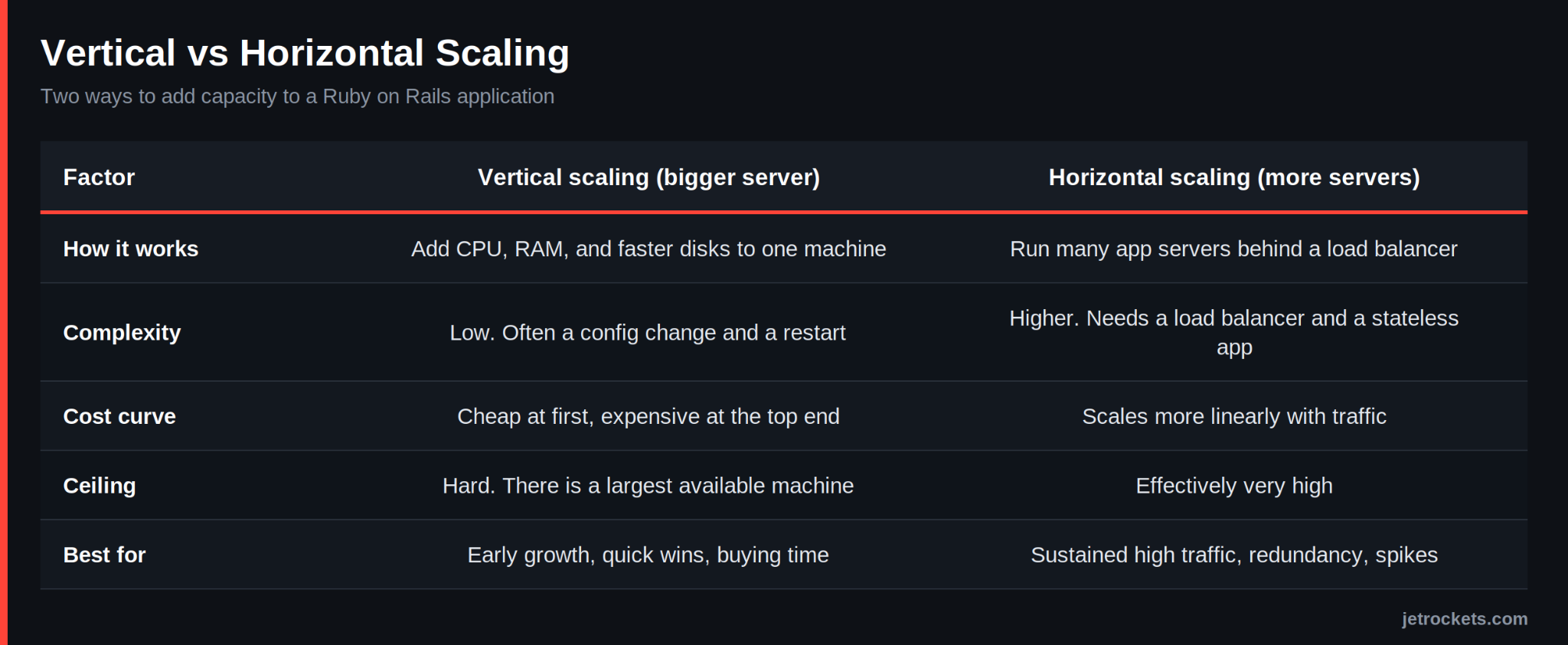
Vertical scaling means a bigger machine. Horizontal scaling means more machines. Most teams scale vertically first because it requires no code changes, and that is fine until the single-server ceiling arrives. Here is how the two compare.
The practical path is to scale vertically for early wins, then move horizontally as traffic grows. Horizontal scaling has one prerequisite that trips teams up: the application has to be stateless. If a user's session or uploaded files live on one specific server, you cannot freely add servers behind a load balancer. Moving session storage to the database or a shared cache, and file storage to a service like S3, is the work that makes horizontal scaling possible. Once the app is stateless, a load balancer distributes traffic across as many app servers as you need, and you add capacity by adding machines.
The Monolith vs Microservices Question
The Rails monolith carries most products much further than the microservices conversation admits. This is the topic where teams make the most expensive scaling mistake, so it is worth being direct.
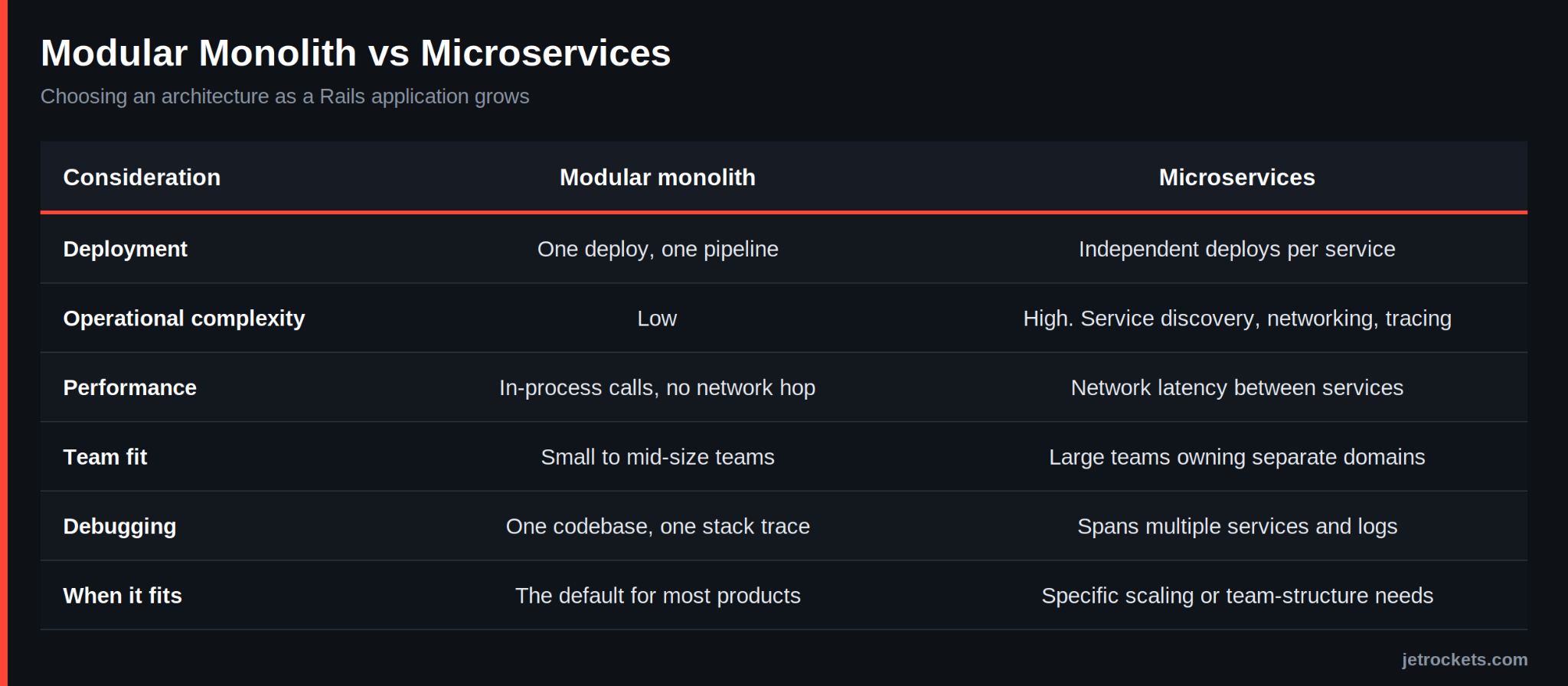
Microservices solve real problems: independent deployment for large teams, isolating a component with genuinely different scaling needs, and letting separate teams own separate services. Those are organizational and architectural problems. The mistake is reaching for microservices to solve a performance problem. Teams break up a working monolith, and in exchange for a slow query, they now understand, they get network latency, distributed transactions, and debugging across service boundaries, problems that are harder than the one they started with.The middle path is a well-structured modular monolith: clear internal boundaries between domains, enforced in code, without the network and operational tax of separate services. It keeps the option of extracting a service later, if and when a specific component genuinely needs it, without paying for distribution before you need it. If you are heading toward an API-driven or service-oriented architecture, the patterns in the ultimate guide to Ruby on Rails API development are the place to start.
Infrastructure and Deployment for Scale
Scaling architecture only pays off if you can deploy it reliably and reproducibly. Containerizing the application with Docker gives you environments that behave consistently across development, staging, and production, removing a whole category of "works on my machine" failures as you add servers.
For deployment itself, Kamal has become a strong, straightforward option for getting a containerized Rails app onto your own servers without the overhead of a heavier orchestration platform. We covered the tooling and the thinking behind it in Good Oldies: MRSK (Kamal) and Rails 6. For most growing Rails applications, Docker plus Kamal on cloud infrastructure and a load balancer is enough capacity to scale a long way before anything more complex is warranted.
When to Bring in Senior Help
Plenty of scaling work is well within reach of a capable in-house team, and naming when it is not is part of an honest answer. A few signals tend to mean the problem needs outside architectural judgment. Response times are climbing, and the team has tuned the obvious things without it helping. Infrastructure spend is rising faster than the user base, which usually means the app is scaling by brute force rather than by design. A major decision is on the table, like read replicas, a caching strategy, or whether to extract a service, and there is nobody in the room who has made that exact call at scale before.
For those moments, our Rails performance audit gives you a prioritized list of what to fix, ordered by impact, so the team is not guessing. If the decisions you are facing call for senior architectural judgment a few days a week rather than a full-time hire, the Fractional CTO model is built for exactly that. Either way you work with co-founders, not a junior team, and you own all the code. You can see the full range on our services page.
Frequently Asked Questions
How do I know if my Rails app needs scaling or just optimization? Optimization makes a given request faster; scaling lets the app handle far more requests at once. If the app is slow even under light load, that is an optimization problem, usually N+1 queries or missing indexes. If it performs fine until traffic climbs and then degrades, that is a scaling problem in the database, caching, or background jobs. Most growing apps need both, in that order.
Can Ruby on Rails handle high traffic? Yes. Shopify, GitHub, and Basecamp all run very large Rails applications serving enormous traffic. Rails scales well when the architecture is sound, and the framework itself is rarely the ceiling. When a Rails app cannot keep up, the cause is almost always the database or the application architecture, not the language or the framework.
What is the first thing to fix when a Rails app is slow? The database, in nearly every case. Start by finding N+1 queries with a tool like Bullet, adding missing indexes, and removing unbounded queries that load entire tables into memory. These three fixes resolve the majority of Rails performance problems before any infrastructure change is needed.
Do I need microservices to scale Rails? Usually not. Microservices solve team-structure and independent-deployment problems, not performance problems. A well-structured modular monolith, with clear internal boundaries, carries most products much further than the hype suggests. Reach for microservices when a specific component has genuinely different scaling needs or a separate team needs to own it, not as a default response to load.
How much does it cost to scale a Rails application? It depends entirely on where the bottleneck is. Tuning queries and adding caching is far cheaper than re-architecting for horizontal scale. The honest first step is a diagnosis rather than a quote. JetRockets offers a free Rails code audit that identifies the highest-impact work, and engagements start at a published $25,600 minimum, with retainers from $22,000 a month, so there are no surprises on scope or cost.